

Table of Contents
- Video of Custom Avatar for Guest Comments in WordPress
- What is Gravatar?
- How Gravatar Increases HTTP Requests and Slows Down WordPress
- How to Use a Custom Default Avatar in WordPress
- Creating a Custom Avatar for Your WordPress Website
- PHP Code to Add a Custom Avatar in WordPress
- Change Discussion Settings in WordPress Dashboard Area
- Minimizing Plugin Usage for Optimal Performance
- The Overlooked Power of Custom Avatars in WordPress
- The Importance of Avatars for Social Presence on LELB Society




add_filter('get_avatar', function($avatar, $id_or_email, $size, $default, $alt) {
    $custom_avatar_url = 'https://yourwebsite.com/wp-content/uploads/your-custom-avatar.jpg'; // Replace this with the actual URL of your custom avatar image
    if (strpos($avatar, 'gravatar.com') !== false || strpos($default, 'gravatar.com') !== false) {
        $avatar = "<img alt='{$alt}' src='{$custom_avatar_url}' class='avatar avatar-{$size} photo' height='{$size}' width='{$size}' />";
    }
    return $avatar;
}, 10, 5);
This code ensures that guest commenters are assigned a custom avatar stored on your website instead of the default Gravatar image, reducing external requests and improving site performance. Logged-in users with a Gravatar will still see their profile picture as usual. After adding the snippet, clear your WordPress and CDN cache to see the changes in action.
Change Discussion Settings in WordPress Dashboard Area
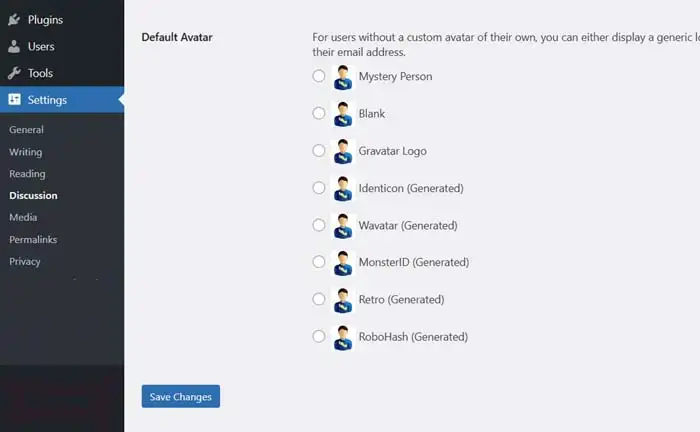
Now that you’ve added the PHP code, the next step is to navigate to your WordPress dashboard. From there, go to the “Settings” menu and click on “Discussion.” Scroll down to the “Default Avatar” section, where you will see various options for the default avatar. Select the “Custom Avatar” option from the list. This will ensure that your custom avatar is used for guest comments. Once you’ve made your selection, don’t forget to hit the “Save Changes” button at the bottom of the page to apply the new settings. Your WordPress site will now display the custom avatar you uploaded for guest comments, providing a personalized touch for your visitors.
Minimizing Plugin Usage for Optimal Performance

There are probably a multitude of WordPress plugins that could achieve this function. However, at LELB Society, a large educational membership website with 4,500 posts and 8,300 comments, we limit our use to only six plugins. This approach is intentional because installing numerous plugins for each individual function is not recommended and can lead to performance issues, increased security vulnerabilities, and potential conflicts. By carefully selecting and minimizing plugin usage, we maintain optimal site performance and reliability, ensuring a smooth experience for our users.
The Overlooked Power of Custom Avatars in WordPress

WordPress is the most popular content management system (CMS) in the world, powering more than 40% of all websites. The platform’s popularity means that a significant portion of its users and commenters are logged-out users. Consequently, the default Gravatar, such as the dull and clichéd Mystery Person, is frequently overused across countless websites. This widespread use of the default avatar leads to a lack of personalization and uniqueness in comment sections, making user interactions feel impersonal and monotonous.
It’s puzzling why many prestigious websites on WordPress haven’t adopted the practice of setting custom avatars, given the simple steps involved in doing so. Custom avatars not only enhance the visual appeal of a site but also contribute to a more engaging and memorable user experience. By replacing the generic Gravatar with a unique image, websites can reinforce their brand identity and foster a sense of community among their visitors. Despite the clear benefits, it seems that the convenience of sticking with the default settings often outweighs the effort required to implement custom avatars. It’s time for more WordPress sites to realize the potential of this small yet impactful customization.
The Importance of Avatars for Social Presence on LELB Society
As an educational website built on WordPress, LELB Society thrives on engagement and community interaction. Disabling avatars entirely would diminish the social presence that motivates students, teachers, and authors to participate in asynchronous discussions. Seeing their own profile pictures next to comments, forum posts, and author pages fosters a stronger sense of identity and belonging within the learning community. This visual representation enhances user engagement and encourages more meaningful interactions.

By keeping avatars enabled, LELB Society maintains a dynamic and interactive environment where contributors feel recognized and valued. Profile pictures personalize discussions, making online interactions more relatable and engaging. Instead of removing avatars, optimizing them—such as hosting default guest avatars locally—ensures a balance between social presence, branding, and website performance.
To test how custom avatars appear on LELB Society, simply scroll down to the comment box below and locate the avatar image associated with a guest comment. You can right-click on the image and select “Copy image address” to view the URL. This will reveal that the custom avatar is locally hosted on our server. This method not only ensures a personalized user experience but also improves load times and performance by utilizing our server’s resources. Feel free to experiment with different comments and avatars to see how they integrate seamlessly with the LELB Society platform.

This is a sample test comment written by a guest commenter at LELB Society to check the custom avatar for guest commenters without an account at LELB Society.
Thanks for leaving a comment as a guest commenter to test our custom avatar.